
How to show multiple articles using an interface, a service and component interaction
About 5 min
How to show multiple articles using an interface, a service and component interaction
- Our goal in this module is to show a list of articles on the homepage
- We will take the following steps to achieve this:
- Creating an
interfacefor an article with all thepropertiesan article should contain - Refactor the
ArticleComponentso it works together with theinterface - Creating a
serviceclasswith amethodthat returns 2 dummy articles - Injecting the
servicein ourHomeComponent, getting the 2 articles and using theArticleComponentto show these 2 articles
- Creating an
What is an interface?
- An interface is a specification that identifies a related set of properties and methods to be implemented by a class. In other words, a given class agrees to support this specification when it implements that interface.
- The interface is simply the definition of the properties and methods, and the class that implements that interface has the actual code for each of those defined properties and methods. In Typescript, you can use the interface itself as a data type. Interfaces in Typescript are a development time only concept, they are not included in the final JavaScript after the build process.
Creating the interface
- An article is a collection of
propertieswhich define the state of the article - Create a new
article.tsfile in thesrc/appfolder:
ng g i article
The result:
export interface Article {
  id: number;
  title: string;
  subtitle: string;
  imageUrl: string;
  imageCaption: string;
  content: string;
  author: string;
  publishDate: string;
}
- This
interfacewill be used to create our 2 dummy articles - Later on we can re-use this
interfaceif we get articles back from ourAPI
export
- Don't forget to
exporttheinterface, this way we can import (and use it) in otherTypeScriptclasses (components,services,interfaces,...)
Refactoring the ArticleComponent to work with the interface
- We want to be able use the
ArticleComponentin any othercomponentto show the article - An
articleis now defined by aninterface - When calling the
ArticleComponentwe can pass anarticleasinputparameter, which will be used to construct the correctHTML - Modify the
article-component.tsfile as follows:
import { Component, Input, OnInit } from '@angular/core';
import { Article } from '../article';

@Component({
  selector: 'app-article-component',
  imports: [],
  templateUrl: './article-component.html',
  styleUrls: ['./article-component.css']
})
export class ArticleComponent implements OnInit {
  @Input() article!: Article;

  constructor() { }

  ngOnInit(): void {
  }

}
- Modify the
article-component.htmlfile as follows:
@if(article) {
<article>
  <h1>{{article.title}}</h1>
  <h4>{{article.subtitle}}</h4>
  <figure>
    <img src="{{article.imageUrl}}" alt="{{article.imageCaption}}" />
    <figcaption>{{article.imageCaption}}</figcaption>
  </figure>
  <p>{{article.content}}</p>
  <footer>
    <p>Author: {{article.author}}, Published: {{article.publishDate}}</p>
  </footer>
</article>
}
@if(article) { ... }: only show thearticle elementwhen thearticle propertyin theArticleComponentis not undefined
{{article.title}}
<!-- interpolation -->
interpolation: shows thetitle-value of thearticle
Data-binding
- In the
ArticleComponentwe are making use ofdata-binding. In essence this means that you can show the values of anypropertydefined in the class file (article-component.ts) on your template file (article-component.html) - We use the double curly brackets to access the
property, and in this case the.xxxnotation to navigate to thepropertywe want to show e.g.article.titlefor the title - This form of
data-bindingis calledinterpolation
@Input() decorator
- The
@Input()decorator before thepropertymeans that we can pass a value to it when calling thecomponent - We'll see how it works when we show the
ArticleComponenton theHomeComponent
Creating the service
- In Angular, a
serviceis typically aclasswith a narrow, well-defined purpose. - In our app, an
ArticleServicewhich gives us a list of articles would be convenient - Create the
ArticleServicein thesrc/appfolder by executing the following command:
ng g s article-service
- This results in the
article-service.tsfile
ng g s article
s: shorthand notation forservicearticle: name of theservice, name will be suffixed with.service
- Replace the content of the
article-service.tsfile with the following code:
import { Injectable } from '@angular/core';
import { Article } from './article';

@Injectable({
  providedIn: 'root'
})
export class ArticleService {

  constructor() { }

  getArticles(): Article[] {
    let articles: Article[] = [];

    let article1: Article = {
      id: 1,
      title: "Title article",
      subtitle: "Subtitle article",
      imageUrl: "https://images.pexels.com/photos/1202723/pexels-photo-1202723.jpeg?auto=compress&cs=tinysrgb&dpr=2&h=100&w=134",
      imageCaption: "caption image",
      content: `Lorem ipsum dolor sit amet consectetur adipisicing elit. Tenetur voluptas sequi voluptatum pariatur! Quae cumque
      quidem dolor maxime enim debitis omnis nemo facilis sequi autem? Quae tenetur, repellat vero deleniti vitae
      dolores? Cum tempore, mollitia provident placeat fugit earum, sint, quae iusto optio ea officiis consectetur sit
      necessitatibus itaque explicabo?`,
      author: "Michaël Cloots",
      publishDate: "28/11/2020"
    };

    let article2: Article = {
      id: 2,
      title: "Title article 2",
      subtitle: "Subtitle article 2",
      imageUrl: "https://images.pexels.com/photos/3422964/pexels-photo-3422964.jpeg?auto=compress&cs=tinysrgb&dpr=2&h=100&w=134",
      imageCaption: "caption image 2",
      content: `2 Lorem ipsum dolor sit amet consectetur adipisicing elit. Tenetur voluptas sequi voluptatum pariatur! Quae cumque
      quidem dolor maxime enim debitis omnis nemo facilis sequi autem? Quae tenetur, repellat vero deleniti vitae
      dolores? Cum tempore, mollitia provident placeat fugit earum, sint, quae iusto optio ea officiis consectetur sit
      necessitatibus itaque explicabo?`,
      author: "Florian Smeyers",
      publishDate: "30/11/2020"
    };

    articles.push(article1);
    articles.push(article2);

    return articles;
  }

}
| code | description |
|---|---|
import { Article } from './article'; | We want to make use of the Article-interface, so we must import the file (this is just a JS import and has nothing to do with the modularity system in Angular) |
getArticles(): Article[] { ... } | Method which returns an Article-array with 2 dummy articles |
let articles: Article[] = []; | Declaration of the Article-array |
let article1: Article = { ... } | Notation for creating a variable based on the Article-interface |
Calling the service in the HomeComponent
- If you want to use a service in your
componentyou have to inject it using theinjectmethod. - For our
home-component.ts:
import { Component, inject, OnInit } from '@angular/core';
import { Article } from '../article';
import { ArticleService } from '../article-service';
import { ArticleComponent } from '../article-component/article-component';

@Component({
  selector: 'app-home-component',
  imports: [ArticleComponent],
  templateUrl: './home-component.html',
  styleUrl: './home-component.css'
})
export class HomeComponent implements OnInit {
  articles: Article[] = [];
  private readonly articleService = inject(ArticleService);

  ngOnInit(): void {
    this.articles = this.articleService.getArticles();
  }
}
- In the
ngOnInit()lifecycle hook method we get all the articles via theArticleService - This is a private variable which can be accessed through the
thiskeyword (= context of class) - At last we can perform another
data-binding(interpolation) to show the articles on the template (HTML):
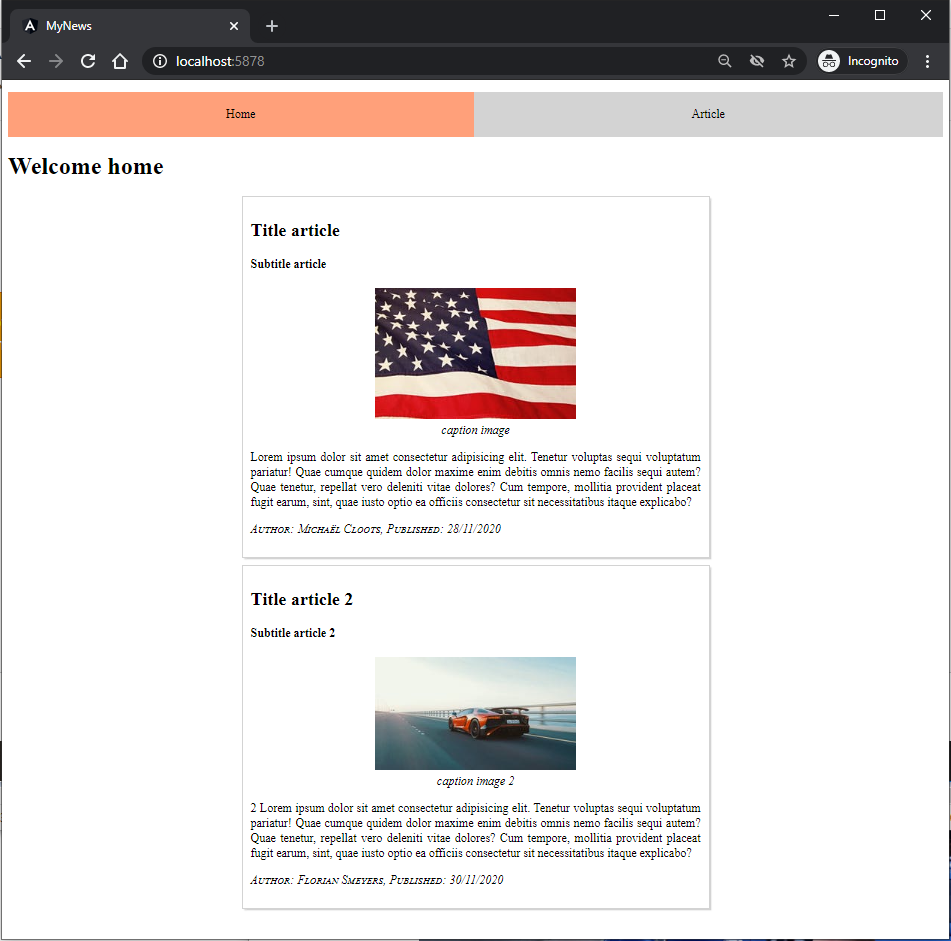
<h1>Welcome home</h1>
@for (article of articles; track $index) {
<app-article-component [article]="article"></app-article-component>
}
| code | description |
|---|---|
<app-article-component></app-article-component> | Selector for our ArticleComponent. This way the component will be loaded |
@for (article of articles; track $index) { ... } | structural directive: for each article in the array (what we get back from the ArticleService I want to load the ArticleComponent) |
[article]="article" | Passing the article as a parameter (which is the @Input() article property in the ArticleComponent |
Data-binding
articlesis aproperty(array of article) in thehome-component.ts, therefore we can use it in our template (HTML)articleis thecursorfrom the*ngFordirective (let article of articles)
@Input() decorator (2)
- If we specify the
@Input()decorator without aparameter, the property that you can use in thetemplatewill be the name of theproperty@Input() article: Article;:[article]="article"
- We can specify a custom name by defining the
parameter: -@Input("newsArticle") article: Article;:[newsArticle]="article"
- Because we now use the
ArticleComponentdirectly in ourhome.component.html(for loop!), we have to import it!
// home-component.ts
@Component({
  selector: 'app-home-component',
  imports: [ArticleComponent],
  templateUrl: './home-component.html',
  styleUrls: ['./home-component.css']
})
export class HomeComponent implements OnInit {
Result:
Exercise
Take a backup of the current state of your application (or create a new branch)
- Create a new method in the
ArticleServicethat only gets the articles with apublishDatethat is within one week of today - Show a message "No articles found" when there are no articles to be displayed
- Play around with the publish dates to test all use cases