
Testing
Testing
Unit testing is a critical practice in Angular development as it ensures code reliability, stability, and maintainability. By testing individual components and services, developers can detect bugs early, improve code quality, and prevent regressions during refactoring.
In Angular applications, Vitest (experimental in Angular 20) is now the recommended path for fast unit & component tests. Playwright is a modern E2E framework with reliable cross-browser automation (Chromium/Firefox/WebKit), parallel runs, auto-waits, and trace/viewer tools.
Vitest
Vitest is a Vite-native test runner that's:
- Fast — starts in milliseconds, powered by Vite's dev server.
- Modern — ESM, TypeScript, hot reloading.
- Familiar — Jest-like syntax (
describe,it,expect,vi.fn()). - Angular 20 ready — Angular CLI now supports Vitest for experimental unit testing.
In an NX monorepo, using Vitest instead of Karma dramatically reduces startup time for each Angular app or library.
We've already chosen for Vitest when we were creating the repo. This installed the following devDependencies:
    "@vitest/coverage-v8": "^3.0.5",
    "@vitest/ui": "^3.0.0",
And in each project.json:
- Angular app
"test": {
      "executor": "@nx/vite:test",
      "outputs": ["{options.reportsDirectory}"],
      "options": {
        "reportsDirectory": "../../coverage/apps/swe-demo"
      }
    }
- UI library
"targets": {
    "test": {
      "executor": "@nx/vite:test",
      "outputs": ["{options.reportsDirectory}"],
      "options": {
        "reportsDirectory": "../../../coverage/libs/swe-demo/ui"
      }
    }
  }
Running tests
We can run all our tests for all our projects by executing the following command:
npx nx run-many --all --target=test --parallel
This might result in some errors for now:
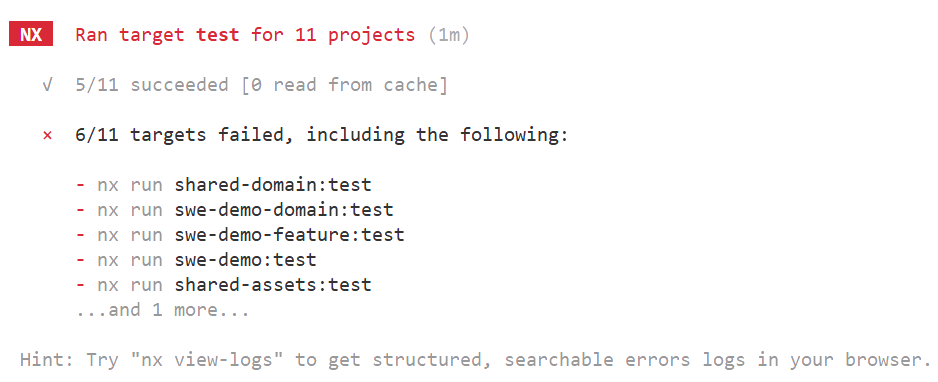
We can run the tests for each library/app by running the test executor for that project:
nx run shared-domain:test
Warning
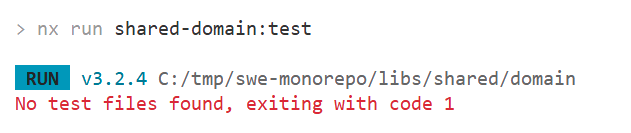
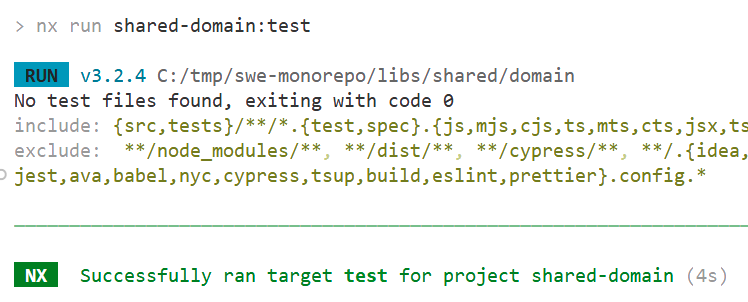
If there are no test files for the project, the test target will fail. We can bypass this by adding passWithNoTests: true to the vite.config.mts for the project:
/// <reference types='vitest' />
import { defineConfig } from "vite";
import angular from "@analogjs/vite-plugin-angular";
import { nxViteTsPaths } from "@nx/vite/plugins/nx-tsconfig-paths.plugin";
import { nxCopyAssetsPlugin } from "@nx/vite/plugins/nx-copy-assets.plugin";

export default defineConfig(() => ({
  root: __dirname,
  cacheDir: "../../../node_modules/.vite/libs/shared/domain",
  plugins: [angular(), nxViteTsPaths(), nxCopyAssetsPlugin(["*.md"])],
  // Uncomment this if you are using workers.
  // worker: {
  //  plugins: [ nxViteTsPaths() ],
  // },
  test: {
    name: "shared-domain",
    watch: false,
    globals: true,
    environment: "jsdom",
    include: ["{src,tests}/**/*.{test,spec}.{js,mjs,cjs,ts,mts,cts,jsx,tsx}"],
    setupFiles: ["src/test-setup.ts"],
    reporters: ["default"],
    coverage: {
      reportsDirectory: "../../../coverage/libs/shared/domain",
      provider: "v8" as const,
    },
    passWithNoTests: true,
  },
}));
Let's run the tests for an Angular app specific domain library, which contains a lego-set.service.ts and a corresponding test file: lego-set.service.spec.ts.
import { Injectable } from "@angular/core";
import { LegoSet } from "@swe-monorepo/shared-domain";
import { httpResource } from "@angular/common/http";

@Injectable({
  providedIn: "root",
})
export class LegoSetService {
  private apiUrl = `${import.meta.env["NG_APP_LEGO_API_URL"]}`;

  legoSetsResource = httpResource<LegoSet[]>(
    () => `${this.apiUrl}/api/legoset`,
    {
      defaultValue: [],
    }
  );
}
import { TestBed } from "@angular/core/testing";

import { LegoSetService } from "./lego-set.service";

describe("LegoSetService", () => {
  let service: LegoSetService;

  beforeEach(() => {
    TestBed.configureTestingModule({});
    service = TestBed.inject(LegoSetService);
  });

  it("should be created", () => {
    expect(service).toBeTruthy();
  });
});
> nx run swe-demo-domain:test

 RUN  v3.2.4 C:/tmp/swe-monorepo/libs/swe-demo/domain
stderr | src/lib/services/lego-set.service.spec.ts > LegoSetService > should be created
ɵNotFound: NG0201: No provider found for `HttpClient`. Source: DynamicTestModule. Path: LegoSetService2 -> HttpClient. Find more at https://angular.dev/errors/NG0201
    at createRuntimeError (file:///C:/tmp/darwin_arm64-fastbuild-ST-199a4f3c4e20/bin/packages/core/src/render3/errors_di.ts:130:17)
    at NullInjector.get (file:///C:/tmp/darwin_arm64-fastbuild-ST-199a4f3c4e20/bin/packages/core/src/di/null_injector.ts:20:21)
    at R3Injector.get (file:///C:/tmp/darwin_arm64-fastbuild-ST-199a4f3c4e20/bin/packages/core/src/di/r3_injector.ts:382:27)
    at R3Injector.get (file:///C:/tmp/darwin_arm64-fastbuild-ST-199a4f3c4e20/bin/packages/core/src/di/r3_injector.ts:382:27)
    at new HttpResourceImpl (file:///C:/tmp/darwin_arm64-fastbuild-ST-199a4f3c4e20/bin/packages/common/http/src/resource.ts:393:28)
    at httpResource (file:///C:/tmp/darwin_arm64-fastbuild-ST-199a4f3c4e20/bin/packages/common/http/src/resource.ts:237:12)
    at LegoSetService2.<instance_members_initializer> (C:\tmp\swe-monorepo\libs\swe-demo\domain\src\lib\services\lego-set.service.ts:11:22)
    at new LegoSetService2 (C:\tmp\swe-monorepo\libs\swe-demo\domain\src\lib\services\lego-set.service.ts:8:8)
    at Object.LegoSetService2_Factory [as factory] (ng:///LegoSetService2/ɵfac.js:5:10)
    at file:///C:/tmp/darwin_arm64-fastbuild-ST-199a4f3c4e20/bin/packages/core/src/di/r3_injector.ts:525:35 {
  code: -201,
  ngErrorCode: -201,
  ngErrorMessage: 'No provider found for `HttpClient`.',
  ngTokenPath: [ 'LegoSetService2', 'HttpClient' ]
}
 ❯  swe-demo-domain  src/lib/services/lego-set.service.spec.ts (1 test | 1 failed) 40ms
   × LegoSetService > should be created 39ms
     → NG0201: No provider found for `HttpClient`. Source: DynamicTestModule. Path: LegoSetService2 -> HttpClient. Find more at https://angular.dev/errors/NG0201
⎯⎯⎯⎯⎯⎯⎯ Failed Tests 1 ⎯⎯⎯⎯⎯⎯⎯
 FAIL   swe-demo-domain  src/lib/services/lego-set.service.spec.ts > LegoSetService > should be created
ɵNotFound: NG0201: No provider found for `HttpClient`. Source: DynamicTestModule. Path: LegoSetService2 -> HttpClient. Find more at https://angular.dev/errors/NG0201
This error means that we aren't setting up our TestBed correctly. Our service uses httpResource to do an HTTP GET request. Therefore it needs to receive the provided httpClient. We do need to set up our isolated test module so we do get everything we need:
import { TestBed } from "@angular/core/testing";

import { LegoSetService } from "./lego-set.service";
import { provideHttpClient } from "@angular/common/http";
import { provideHttpClientTesting } from "@angular/common/http/testing";

describe("LegoSetService", () => {
  let service: LegoSetService;

  beforeEach(() => {
    (import.meta as any).env = {
      ...(import.meta as any).env,
      NG_APP_LEGO_API_URL: "http://test.api", // whatever you prefer
    };

    TestBed.configureTestingModule({
      providers: [provideHttpClient(), provideHttpClientTesting()],
    });

    service = TestBed.inject(LegoSetService);
  });

  it("should be created", () => {
    expect(service).toBeTruthy();
  });
});
import { provideHttpClient } from '@angular/common/http';: registers Angular'shttpClientimport { provideHttpClientTesting } from '@angular/common/http/testing';: registers a mock backend so HTTP calls are intercepted and can be inspected in testsbeforeEach(() => {: Runs before each test (it(...)) inside this suite — ensuring a clean setup.
Unit tests using vitest
Self written functions (framework agnostic)
Functions that are framework agnostic, they can be reused over other JS frameworks, shoud live in the shared/util library of your Nx workspace.
Our self written functions (libs/shared/util/src/lib/helpers/array-utils.ts)
//array-utils.ts
/**
 * Groups items in an array by a key returned from the given key function.
 *
 * @example
 * groupBy(
 *   [{ color: 'red' }, { color: 'blue' }, { color: 'red' }],
 *   item => item.color
 * );
 * // => { red: [{...}, {...}], blue: [{...}] }
 */
export function groupBy<T, K extends PropertyKey>(
  array: readonly T[],
  keyFn: (item: T, index: number, array: readonly T[]) => K
): Record<K, T[]> {
  return array.reduce<Record<K, T[]>>((acc, item, index) => {
    const key = keyFn(item, index, array);
    if (!Object.prototype.hasOwnProperty.call(acc, key)) {
      acc[key] = [];
    }
    acc[key].push(item);
    return acc;
  }, {} as Record<K, T[]>);
}

/**
 * Returns a new array with only the first occurrence of each item,
 * based on the key returned from the given key function.
 *
 * @example
 * uniqueBy(
 *   [
 *     { id: 1, name: 'A' },
 *     { id: 1, name: 'A (duplicate)' },
 *     { id: 2, name: 'B' }
 *   ],
 *   item => item.id
 * );
 * // => [{ id: 1, name: 'A' }, { id: 2, name: 'B' }]
 */
export function uniqueBy<T, K>(
  array: readonly T[],
  keyFn: (item: T, index: number, array: readonly T[]) => K
): T[] {
  const seen = new Set<K>();
  const result: T[] = [];

  array.forEach((item, index) => {
    const key = keyFn(item, index, array);
    if (!seen.has(key)) {
      seen.add(key);
      result.push(item);
    }
  });

  return result;
}
Our unit tests = spec file (libs/shared/util/src/lib/helpers/array-utils.spec.ts)
import { describe, it, expect } from "vitest";
import { groupBy, uniqueBy } from "./array-utils";

describe("groupBy", () => {
  it("groups objects by a string key", () => {
    const items = [
      { id: 1, color: "red" },
      { id: 2, color: "blue" },
      { id: 3, color: "red" },
    ];

    const result = groupBy(items, (item) => item.color);

    expect(result).toEqual({
      red: [
        { id: 1, color: "red" },
        { id: 3, color: "red" },
      ],
      blue: [{ id: 2, color: "blue" }],
    });
  });

  it("returns an empty object for an empty array", () => {
    const result = groupBy([] as { id: number }[], (item) => item.id);
    expect(result).toEqual({});
  });

  it("supports non-string keys (numbers, symbols)", () => {
    const symA = Symbol("A");
    const symB = Symbol("B");

    const items = [1, 2, 3, 4];

    const result = groupBy(items, (n) => (n % 2 === 0 ? symA : symB));

    expect(result[symB]).toEqual([1, 3]);
    expect(result[symA]).toEqual([2, 4]);
  });

  it("passes index and array to the key function", () => {
    const items = ["a", "b", "c"];

    const result = groupBy(items, (_item, index, array) => {
      // group first half vs second half
      return index < array.length / 2 ? "first" : "second";
    });

    expect(result).toEqual({
      first: ["a", "b"],
      second: ["c"],
    });
  });
});

describe("uniqueBy", () => {
  it("keeps only the first item for each key", () => {
    const items = [
      { id: 1, name: "original-1" },
      { id: 2, name: "original-2" },
      { id: 1, name: "duplicate-1" },
      { id: 3, name: "original-3" },
      { id: 2, name: "duplicate-2" },
    ];

    const result = uniqueBy(items, (item) => item.id);

    expect(result).toEqual([
      { id: 1, name: "original-1" },
      { id: 2, name: "original-2" },
      { id: 3, name: "original-3" },
    ]);
  });

  it("returns an empty array for an empty input", () => {
    const result = uniqueBy([] as number[], (n) => n);
    expect(result).toEqual([]);
  });

  it("preserves original order of first occurrences", () => {
    const items = [3, 1, 2, 3, 2, 1, 4];

    const result = uniqueBy(items, (n) => n);

    expect(result).toEqual([3, 1, 2, 4]);
  });

  it("passes index and array to the key function", () => {
    const items = ["a", "b", "c", "d"];

    const result = uniqueBy(items, (_item, index, array) =>
      index < array.length / 2 ? "first-half" : "second-half"
    );

    // First of each half should be kept
    expect(result).toEqual(["a", "c"]);
  });
});
Angular pipes
Angular pipes are not framework agnostic. We can only use them in Angular applications. We will probably want to reuse them over multiple applications, so we put them in the shared/ui library.
An initials pipe (libs/shared/ui/src/lib/pipes/initials-pipe.ts)
import { Pipe, PipeTransform } from "@angular/core";

@Pipe({
  name: "initials",
})
export class InitialsPipe implements PipeTransform {
  transform(name: string | null | undefined): string {
    if (!name) return "";

    // Split by whitespace, remove empty segments
    const parts = name.trim().split(/\s+/);

    if (parts.length === 0) return "";
    if (parts.length === 1) {
      // Single word: take first letter
      return parts[0].charAt(0).toUpperCase();
    }

    // First + last (ignore middle names for cleaner initials)
    const first = parts[0];
    const last = parts[parts.length - 1];

    return (first.charAt(0) + last.charAt(0)).toUpperCase();
  }
}
The spec file (libs/shared/ui/src/lib/pipes/initials-pipe.spec.ts)
import { describe, it, expect } from "vitest";
import { InitialsPipe } from "./initials-pipe";

describe("InitialsPipe", () => {
  const pipe = new InitialsPipe();

  it("returns initials for a regular first + last name", () => {
    expect(pipe.transform("John Doe")).toBe("JD");
    expect(pipe.transform("Ada Lovelace")).toBe("AL");
  });

  it("handles middle names by using only first and last", () => {
    expect(pipe.transform("John Kevin Doe")).toBe("JD");
    expect(pipe.transform("Mary Ann Smith")).toBe("MS");
  });

  it("returns a single initial when only one name part exists", () => {
    expect(pipe.transform("Madonna")).toBe("M");
    expect(pipe.transform("Cher")).toBe("C");
  });

  it("handles leading/trailing/multiple spaces", () => {
    expect(pipe.transform("  Jean   Luc  Picard ")).toBe("JP");
    expect(pipe.transform("   John   ")).toBe("J");
  });

  it("returns empty string for null, undefined, or empty string", () => {
    expect(pipe.transform("")).toBe("");
    expect(pipe.transform(null as unknown as string)).toBe("");
    expect(pipe.transform(undefined as unknown as string)).toBe("");
  });

  it("handles non-ASCII characters properly", () => {
    expect(pipe.transform("Élodie Durand")).toBe("ÉD");
    expect(pipe.transform("Åke Holmström")).toBe("ÅH");
  });
});
Shallow test
Let's test the LegoSetOverview component (feature library). This component is using the LegoSetService to get the available lego sets from the API. We are going to write shallow tests, which means that we are going to mock the service, so we don't actually call the API. We prefer to work with our own mock data. This makes it sure that we work with the same data so we always know what result to expect.
//libs/swe-demo/feature/src/lib/lego-set-overview/lego-set-overview.spec.ts

import { ComponentFixture, TestBed } from "@angular/core/testing";
import { LegoSetOverview } from "./lego-set-overview";
import { LegoSetService } from "@swe-monorepo/swe-demo-domain";
import { provideHttpClient } from "@angular/common/http";
import { provideHttpClientTesting } from "@angular/common/http/testing";
import { signal } from "@angular/core";

type LegoSet = { id: number; name: string; numberOfPieces: number };

describe("LegoSetOverview", () => {
  let component: LegoSetOverview;
  let fixture: ComponentFixture<LegoSetOverview>;

  const MOCK_DATA: LegoSet[] = [
    { id: 1, name: "Millennium Falcon", numberOfPieces: 7541 },
    { id: 2, name: "AT-AT", numberOfPieces: 6785 },
  ];

  const mockService = {
    // emulate httpResource shape: `.value` is a signal
    legoSetsResource: { value: signal<LegoSet[]>(MOCK_DATA) },
  } as unknown as Partial<LegoSetService>;

  beforeEach(async () => {
    await TestBed.configureTestingModule({
      imports: [LegoSetOverview],
      providers: [
        { provide: LegoSetService, useValue: mockService },
        provideHttpClient(),
        provideHttpClientTesting(),
      ],
    }).compileComponents();

    fixture = TestBed.createComponent(LegoSetOverview);
    component = fixture.componentInstance;
    fixture.detectChanges();
  });

  it("should create", () => {
    expect(component).toBeTruthy();
  });

  it("renders one <p> per lego set with name and piece count", () => {
    const ps = fixture.nativeElement.querySelectorAll("p");
    expect(ps.length).toBe(2);
    expect(ps[0].textContent).toContain("Millennium Falcon - 7541");
    expect(ps[1].textContent).toContain("AT-AT - 6785");
  });

  it("reacts when the signal value changes", () => {
    // push an update into the signal and verify the DOM updates
    const svc = TestBed.inject(LegoSetService) as any;
    svc.legoSetsResource.value.set([
      { id: 3, name: "X-Wing", numberOfPieces: 1949 },
    ]);
    fixture.detectChanges();

    const ps = fixture.nativeElement.querySelectorAll("p");
    expect(ps.length).toBe(1);
    expect(ps[0].textContent).toContain("X-Wing - 1949");
  });
});
Things get also interesting when testing a feature component that has a ui component as a child. Let's write some tests for the NavbarContainer feature component:
import { ComponentFixture, TestBed } from "@angular/core/testing";
import { NavbarContainer } from "./navbar-container";
import { provideRouter, Router, RouterModule } from "@angular/router";
import { Component, EventEmitter, Input, Output } from "@angular/core";
import { By } from "@angular/platform-browser";

// Match the external component's selector + IO API
@Component({
  selector: "lib-swe-demo-ui-navbar",
  standalone: true,
  template: `
    <!-- Minimal stub template -->

    <button id="emit-navigate" (click)="navigate.emit('/products')">
      go products
    </button>
    <button id="emit-logout" (click)="logout.emit()">logout</button>
  `,
})
class NavbarStub {
  @Input() items!: any[];
  @Input() showUser!: boolean;
  @Output() navigate = new EventEmitter<string>();
  @Output() logout = new EventEmitter<void>();
}

describe("NavbarContainer", () => {
  let component: NavbarContainer;
  let fixture: ComponentFixture<NavbarContainer>;
  let router: Router;

  beforeEach(async () => {
    await TestBed.configureTestingModule({
      imports: [NavbarContainer],
      providers: [provideRouter([])],
    })
      .overrideComponent(NavbarContainer, {
        set: { imports: [NavbarStub, RouterModule] },
      })
      .compileComponents();

    router = TestBed.inject(Router);
    fixture = TestBed.createComponent(NavbarContainer);
    component = fixture.componentInstance;
    fixture.detectChanges(); // run initial CD so inputs flow to stub
  });

  it("should create", () => {
    expect(component).toBeTruthy();
  });

  it("passes computed items and showUser=true to the Navbar", () => {
    const de = fixture.debugElement.query(By.directive(NavbarStub));
    const stub = de.componentInstance as NavbarStub;

    expect(Array.isArray(stub.items)).toBe(true);
    expect(stub.items.map((i) => i.label)).toEqual([
      "Home",
      "Products",
      "Account",
    ]);
    expect(stub.items.map((i) => i.path)).toEqual([
      "/",
      "/products",
      "/account",
    ]);
    expect(stub.showUser).toBe(true);
  });

  it("navigates when (navigate) is emitted by the Navbar", async () => {
    const navigateSpy = vi
      .spyOn(router, "navigate")
      .mockResolvedValue(true as any);

    const btn = fixture.nativeElement.querySelector(
      "#emit-navigate"
    ) as HTMLButtonElement;
    btn.click();
    // navigation is async; flush microtasks
    await Promise.resolve();

    expect(navigateSpy).toHaveBeenCalledWith(["/products"]);
  });

  it("calls onLogout when (logout) is emitted by the Navbar", () => {
    const logoutSpy = vi.spyOn(fixture.componentInstance, "onLogout");

    const btn = fixture.nativeElement.querySelector(
      "#emit-logout"
    ) as HTMLButtonElement;
    btn.click();

    expect(logoutSpy).toHaveBeenCalledTimes(1);
  });

  it("exposes items() as a computed list (unit sanity)", () => {
    // Access the signal directly on the component class
    const items = fixture.componentInstance.items();
    expect(items).toHaveLength(3);
    expect(items[0]).toEqual({ label: "Home", path: "/" });
  });
});
Playwright (e2e)
End-to-end (E2E) testing is the practice of verifying that your entire application works as a complete system — from the user's perspective. Instead of testing isolated components or services, E2E tests simulate real user interactions in a real browser, navigating through the UI, clicking buttons, typing in inputs, and verifying what's rendered on screen.
Think of E2E tests as an automated user: "Open the browser, go to the homepage, wait for the LEGO sets to load, and confirm that their names appear."
Playwright is Microsoft's modern, fast, cross-browser E2E testing framework. It controls Chromium, Firefox, and WebKit browsers programmatically, allowing you to write clear, readable tests in TypeScript.
Why Playwright?
- Runs the real Angular app in a browser, no special build.
- Can mock network requests (page.route(...)) for predictable results.
- Supports screenshots, video recording, and trace viewer.
- Works perfectly in Nx and CI pipelines.
Make sure to install the latest browsers to run the e2e tests locally:
npx playwright install
Now find the e2e app in you Nx workspace: apps/swe-demo-e2e and open the src/example.spec.ts
import { test, expect } from "@playwright/test";

test("has title", async ({ page }) => {
  await page.goto("/");

  //expect('test').toBe('test');
  //Expect h1 to contain a substring.
  expect(await page.locator("h1").innerText()).toContain("Lego sets");
});
- This test only succeeds if there is a
<h1>on the home page with the text Lego sets - Our application that we are testing is actually running in the browser and we navigate to the home page in our test:
await page.goto("/"); - Then we can inspect
htmlelements and check if the values are what we expect.
We can also fake our api call and return a mocked set of data using page.route and check if our lego sets are shown on our page!
const API = "**/api/legoset";

test("renders mocked lego sets", async ({ page }) => {
  await page.route(API, (route) =>
    route.fulfill({
      status: 200,
      contentType: "application/json",
      body: JSON.stringify([
        { id: 42, name: "Rivendell", numberOfPieces: 6167 },
        { id: 7, name: "Hogwarts Castle", numberOfPieces: 6020 },
      ]),
    })
  );

  await page.goto("/");

  await expect(page.getByText("Rivendell - 6167")).toBeVisible();
  await expect(page.getByText("Hogwarts Castle - 6020")).toBeVisible();
});
.NET Unit testing (xUnit V3)
- Close your visual studio solution!
- Create a new
testsfolder in yourNxworkspace - Add a new folder for each type of library you want to test. We will start with unit tests for our
domainlibrary - Execute the command
dotnet new install xunit.v3.templatesin your terminal to installxUnit V3 - Open your visual studio solution
- We need a new xUnit.net V3 Test Project for our
domainlibrary intests\swe-demo-backend\domain. Make sure to add it to our existing visual studio solution:SweDemoBackend.Domain.UnitTests - Add a project reference to the
SweDemoBackend.Domainproject
This is our LegoSet class, with some business logic like:
- The name is trimmed
- Number of pieces can't be zero or below
- It generates a new unique
Guidfor each lego set
  public class LegoSet
  {
    public Guid Id { get; set; }
    public string Name { get; set; }
    public int NumberOfPieces { get; set; }

    // Private ctor: only create via Create/Restore
    private LegoSet(string name, int numberOfPieces)
    {
      if (string.IsNullOrWhiteSpace(name)) throw new ArgumentException("Name required", nameof(name));
      if (numberOfPieces <= 0) throw new ArgumentOutOfRangeException(nameof(numberOfPieces));
      if(Id == Guid.Empty)
      {
        Id = Guid.NewGuid();
      }
      Name = name.Trim();
      NumberOfPieces = numberOfPieces;
    }

    // Used to create an entity in controller based on CreateLegoSetRequest
    public static LegoSet Create(string name, int pieceCount)
        => new(name, pieceCount);
  }
We can test this business logic by writing unit tests:
using SweDemoBackend.Domain.Entities;

namespace SweDemoBackend.Domain.UnitTests
{
  public class LegoSetTests
  {
    [Fact]
    public void Create_WithValidInputs_SetsProperties()
    {
      // arrange
      var name = "Millennium Falcon";
      var pieces = 7541;

      // act
      var set = LegoSet.Create(name, pieces);

      // assert
      Assert.Equal(name, set.Name);
      Assert.Equal(pieces, set.NumberOfPieces);
      Assert.NotEqual(Guid.Empty, set.Id);
    }

    [Fact]
    public void Create_WhitespaceName_IsTrimmed()
    {
      // arrange
      var name = "  Rivendell  ";
      var pieces = 6167;

      // act
      var set = LegoSet.Create(name, pieces);

      // assert
      Assert.Equal("Rivendell", set.Name);
    }

    [Theory]
    [InlineData(null)]
    [InlineData("")]
    [InlineData("   ")]
    public void Create_NullOrWhitespaceName_Throws(string? badName)
    {
      // act
      var ex = Assert.Throws<ArgumentException>(() => LegoSet.Create(badName!, 100));

      // assert
      Assert.Equal("name", ex.ParamName);            // thrown from private ctor: nameof(name)
      Assert.Contains("Name required", ex.Message);  // optional: checks your error text
    }

    [Theory]
    [InlineData(0)]
    [InlineData(-1)]
    [InlineData(-100)]
    public void Create_NonPositivePieceCount_Throws(int badPieceCount)
    {
      // act
      var ex = Assert.Throws<ArgumentOutOfRangeException>(() => LegoSet.Create("Any", badPieceCount));

      // assert
      // Thrown in the private ctor with nameof(numberOfPieces)
      Assert.Equal("numberOfPieces", ex.ParamName);
    }

    [Fact]
    public void Create_GeneratesNonEmptyId()
    {
      // act
      var set = LegoSet.Create("AT-AT", 6785);

      // assert
      Assert.NotEqual(Guid.Empty, set.Id);
    }

    [Fact]
    public void Create_GeneratesUniqueIds_ForDifferentInstances()
    {
      // act
      var a = LegoSet.Create("Set A", 1000);
      var b = LegoSet.Create("Set B", 2000);

      // assert
      Assert.NotEqual(a.Id, b.Id);
    }
  }
}
To configure this as an Nx project (important so the tests are ran when we want to run all the tests in our workspace) we have to add a project.json in the root of the unit test project:
{
  "name": "swe-demo-backend-domain-unit-tests",
  "tags": ["scope:domain", "type:test"],
  "targets": {
    "test": {
      "executor": "nx:run-commands",
      "options": {
        "command": "dotnet test tests/swe-demo-backend/domain/SweDemoBackend.Domain.UnitTests/SweDemoBackend.Domain.UnitTests/SweDemoBackend.Domain.UnitTests.csproj --nologo"
      }
    }
  }
}