
Reactive programming
Reactive programming
Reactive programming is a programming paradigm that deals with asynchronous data streams. It is a way of thinking about and writing code that is declarative, event-driven, and non-blocking.
Angular is a framework that is well-suited for reactive programming. The RxJS library, which is included with Angular, provides a set of tools for working with reactive streams.
There are several benefits to using reactive programming in Angular applications. These include:
- Better performance: Reactive programming can help to improve the performance of Angular applications by making them more responsive and efficient.
- Better code: Reactive programming can help to write cleaner, more concise, and more maintainable code.
- Better testing: Reactive programming can make it easier to test Angular applications.
If you are developing Angular applications, I encourage you to consider using reactive programming. It is a powerful tool that can help you to write better, more performant, and more maintainable code.
VM$ pattern
Reactive programming can be a bit overwhelming in the beginning. Let us try to understand it by approaching it step by step, solving a common use case.
Use case
Sometimes a component has multiple asynchronous sources. A user interaction might require to reload/retrigger these resources. As shown in the following example, this can get quite messy!
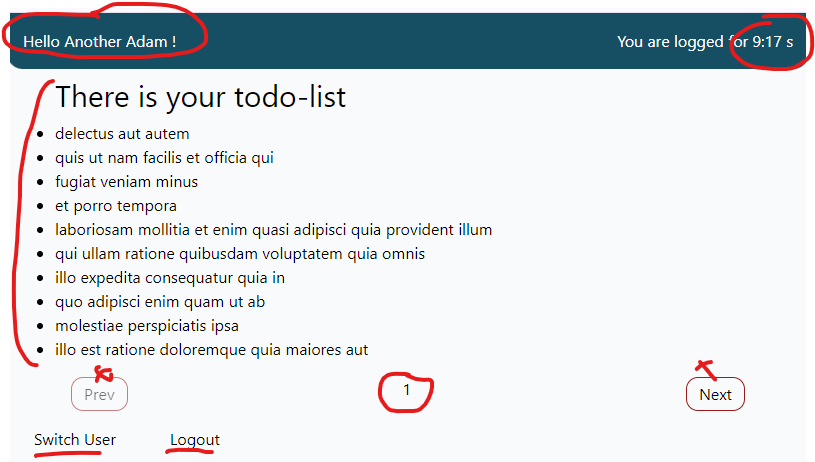
This use case consists of one component with the following functionalities
- A timer (how long are we visiting this webpage?)
- A user, which we can switch (giving a random name) or logout (anonymous)
- A todo list, with the possibility to navigate to previous or next pages
The component in it's entirety will look as follows:
Solution 1 (not ideal)
- Multiple
observables - Multiple
asyncpipes in the template for subscription
Component code:
@Component({
  selector: 'app-pseudo-page',
  standalone: true,
  imports: [AsyncPipe],
  templateUrl: './pseudo-page.component.html',
  styleUrl: './pseudo-page.component.css',
})
export class PseudoPageComponent {
  private readonly todoService = inject(TodoListService);
  private currentPageSubject = new BehaviorSubject<number>(1);
  readonly currentPage$ = this.currentPageSubject.asObservable();
  readonly currentUser$ = inject(CurrentUserService).currentUser$;

  readonly loggedTime$ = interval(1000);
  readonly todoList$ = this.currentPage$.pipe(
    switchMap((page) => this.todoService.getTodos(page, 10))
  );

  prevPage() {
    this.currentPageSubject.next(
      this.currentPageSubject.value - 1 < 1
        ? 1
        : this.currentPageSubject.value - 1
    );
  }
  nextPage() {
    this.currentPageSubject.next(
      this.currentPageSubject.value + 1 > 10
        ? 10
        : this.currentPageSubject.value + 1
    );
  }
}
Template:
<div class="pseudo-page__header">
  <h3>Hello {{ currentUser$ | async }} !</h3>
  <h3>You are logged for {{ (loggedTime$ | async) || 0 }} s</h3>
</div>
<div class="pseudo-page__container">
  <div class="pseudo-page__todo-list">
    <h2>There is your todo-list</h2>
    <ul>
      @for (element of (todoList$ | async); track element.id) {
        <li>{{ element.title }}</li>
      }
    </ul>
    <div class="pseudo-page__actions">
      <button class="pseudo-page__button" (click)="prevPage();" [disabled]="((currentPage$ | async)  || 1) <= 1">Prev</button>
      <div>{{currentPage$ | async}}</div>
      <button class="pseudo-page__button" (click)="nextPage();" [disabled]="((currentPage$ | async) || 1) >= 10">Next</button>
    </div>
  </div>
</div>
Some clarifications
- What is a
BehaviorSubject? (private currentPageSubject = new BehaviorSubject<number>(1);)- Something you can subscribe to to get the most recent value AND any future values
- We can emit a new value to the
BehaviorSubjectby using thenextmethod (passing the new value as the parameter) - Everyone who is subscribed to this
BehaviorSubject(most of the timecomponents) gets this new value and react on this new value by performing the necessary actions
asObservable()- A
BehaviorSubjectcan be converted into anobservable - This way we can subscribe to this new
observablebut we can't emit any values anymore - This helps enforce a unidirectional data flow, where only the service or class that owns the subject can change the value, while other parts of the application can only observe it.
- A
inject(TodoListService)- Dependency Injection!
- We can either inject classes through the
constructoror we can use theinjectmethod!
switchMap((page) => this.todoService.getTodos(page, 10))- An
operatorinRxJS - Maps each value emitted by an observable (
getTodos) to a new observable - Crucially,
switchMapunsubscribes from the previous observable whenever a new value is emitted. This makes it ideal for situations where you only want the latest result of an asynchronous operation, such as an HTTP request. - When a new page number is emitted,
switchMapcancels any in-progress requests and starts a new request using the getTodos method with the new page number.
- An
Disadvantages?
- We count 6
async pipes= 6 different subscriptions! This might lead to issues with performance and code maintainability/readability! - The template really looks messy!
Solution 2 - ViewModel Old School (better)
What is a ViewModel?
- A part of the MVVM pattern (Model-View-ViewModel)
- Separate Model from View and create a bridge to connect them = ViewModel
- A ViewModel is an object which decides which data will be passed into the View!
So how about MVVM in Angular?
- Model =
Componentand all the data we have there - View =
Template(HTML) - ViewModel =
Propertyin thecomponent, used in thetemplate!
- Model =
In practice:
- We create a property
vm$(this will be anobservable!) - This is a collection/combination of all data needed in the
template - The
combineLatestfunction (RxJS) bundles all our sources together - The
mapoperator (RxJS) changes the value we get into an object - In the
templatewe only have to subscribe to thevm$observable (using theasyncpipe) and call the properties where needed - Every change will be noticed by our
vm$, which will update the correspondingpropertyvalue and rerenders the property in thetemplate(through change detection)
- We create a property
combineLatest + map
combineLatesttakes multiple observables as input and combines their latest emitted values.- The combined observable will emit a new value whenever any of the input observables emit a new value.
- Everytime a new value is emitted, it is mapped (
mapoperator) into an object we can directly use in ourtemplate - This is a very powerful and often seen combination in reactive programming with RxJS!
Component code:
import { Component, inject } from '@angular/core';
import { CurrentUserService } from '../../datasources/current-user';
import { Todo, TodoListService, todoList$ } from '../../datasources/todo-list';
import { AsyncPipe } from '@angular/common';
import {
  BehaviorSubject,
  combineLatest,
  interval,
  map,
  startWith,
  switchMap
} from 'rxjs';

@Component({
  selector: 'app-pseudo-page-vm',
  standalone: true,
  imports: [AsyncPipe],
  templateUrl: './pseudo-page-vm.component.html',
  styleUrl: './pseudo-page-vm.component.css',
})
export class PseudoPageVmComponent {
  private readonly todoService = inject(TodoListService);
  private readonly currentUserService = inject(CurrentUserService);
  private currentPageSubject = new BehaviorSubject<number>(1);
  readonly currentPage$ = this.currentPageSubject.asObservable();

  private readonly loggedTime$ = interval(1000);
  private readonly todoList$ = this.currentPage$.pipe(
    switchMap((page) => this.todoService.getTodos(page, 10))
  );

  readonly vm$ = combineLatest([
    this.loggedTime$.pipe(
      map((time) => {
        const minutes = Math.floor(time / 60);
        const seconds = time - minutes * 60;
        return [minutes, ('0' + seconds).slice(-2)];
      }),
      map((time) => time.join(':')),
      startWith(0)
    ),
    this.currentPage$,
    this.currentUserService.currentUser$,
    this.todoList$.pipe(startWith([])),
  ]).pipe(
    map(([loggedTime, currentPage, currentUser, todoList]) => {
      return {
        loggedTime,
        currentPage,
        currentUser,
        todoList,
      };
    })
  );

  prevPage() {
    this.currentPageSubject.next(
      this.currentPageSubject.value - 1 < 1
        ? 1
        : this.currentPageSubject.value - 1
    );
  }
  nextPage() {
    this.currentPageSubject.next(
      this.currentPageSubject.value + 1 > 10
        ? 10
        : this.currentPageSubject.value + 1
    );
  }
}
Template:
@if (vm$ | async; as vm) {
  <div class="pseudo-page__header">
    <h3>Hello {{ vm.currentUser }} !</h3>
    <h3>You are logged for {{ vm.loggedTime }} s</h3>
  </div>
  <div class="pseudo-page__container">
    <div class="pseudo-page__todo-list">
      <h2>There is your todo-list</h2>
      <ul>
        @for (element of vm.todoList; track element.id) {
          <li>{{ element.title }}</li>
        }
      </ul>
      <div class="pseudo-page__actions">
        <button class="pseudo-page__button" (click)="prevPage();" [disabled]="((vm.currentPage)  || 1) <= 1">Prev</button>
        <div>{{vm.currentPage }}</div>
        <button class="pseudo-page__button" (click)="nextPage();" [disabled]="((vm.currentPage) || 1) >= 10">Next</button>
      </div>
    </div>
  </div>
}
Solution 3 - ViewModel with Signals/Computed/Effects (best)
- What are signals?
- A signal is a wrapper around a value that notifies interested consumers when that value changes
- Signals can contain any value, from primitives to complex data structures
- You read a signal's value by calling its getter function, which allows Angular to track where the signal is used
// Component

// Signal for logged time in seconds
readonly loggedTime = signal(0);

// You can set/update the value, this means that all dependants will get notified

// set
this.loggedTime.set(5000);

// update
interval(1000).subscribe(() => this.loggedTime.update(time => time + 1));
<!-- Template --> <h3>You are logged for {{ loggedTime() }} s</h3> - Computed signals
- Computed signal are read-only signals that derive their value from other signals. You define computed signals using the computed function and specifying a derivation:
// Computed signal to format logged time as MM:SS readonly formattedLoggedTime = computed(() => { const minutes = Math.floor(this.loggedTime() / 60); const seconds = this.loggedTime() % 60; return `${minutes}:${('0' + seconds).slice(-2)}`; });- When the
loggedTimesignal gets a new value,formattedLoggedTimeis automatically re-evaluated (because it's a computed with theloggedTimesignal within)
<!-- Template --> <h3>You are logged for {{ formattedLoggedTime() }} s</h3> - An Effect is an operation that runs whenever one or more signal values change. You can create an effect with the effect function:
// Effect to fetch todos whenever the currentPage or todosPerPage signal values change effect(() => { const page = this.currentPage(); const limit = this.todosPerPage(); this.fetchTodos(page, limit); });- Effects always run at least once. When an effect runs, it tracks any signal value reads. Whenever any of these signal values change, the effect runs again.
Component code:
import { Component, computed, inject, signal } from '@angular/core';
import { interval } from 'rxjs';
import { TodoListSignalsService } from '../../datasources/todo-list-signals';
import { CurrentUserSignalsService } from '../../datasources/current-user-signals';

@Component({
  selector: 'app-pseudo-page-signals',
  standalone: true,
  imports: [],
  templateUrl: './pseudo-page-signals.component.html',
  styleUrl: './pseudo-page-signals.component.css'
})
export class PseudoPageSignalsComponent {
  private readonly todoService = inject(TodoListSignalsService);
  private readonly currentUserService = inject(CurrentUserSignalsService);
  readonly currentUser = this.currentUserService.currentUserName;

  // Signal for logged time in seconds
  readonly loggedTime = signal(0);

  // Interval effect to update the logged time every second
  constructor() {
    interval(1000).subscribe(() => this.loggedTime.update(time => time + 1));
  }

  // Computed signal to format logged time as MM:SS
  readonly formattedLoggedTime = computed(() => {
    const minutes = Math.floor(this.loggedTime() / 60);
    const seconds = this.loggedTime() % 60;
    return `${minutes}:${('0' + seconds).slice(-2)}`;
  });

  // Computed signals to access the todos, currentPage, etc.
  readonly todoList = computed(() => this.todoService.todos());
  readonly currentPage = computed(() => this.todoService.currentPage());

  // Methods to navigate between pages
  prevPage() {
    const page = this.currentPage();
    this.todoService.setPage(Math.max(1, page - 1));
  }

  nextPage() {
    const page = this.currentPage();
    this.todoService.setPage(Math.min(10, page + 1));
  }
}
Template:
<div class="pseudo-page__header">
    <h3>Hello {{ currentUser }} !</h3>
    <h3>You are logged for {{ loggedTime() }} s</h3>
</div>
<div class="pseudo-page__container">
    <div class="pseudo-page__todo-list">
        <h2>There is your todo-list</h2>
        <ul>
            @for (element of todoList(); track element.id) {
            <li>{{ element.title }}</li>
            }
        </ul>
        <div class="pseudo-page__actions">
            <button class="pseudo-page__button" (click)="prevPage();"
                [disabled]="((currentPage())  || 1) <= 1">Prev</button>
            <div>{{currentPage() }}</div>
            <button class="pseudo-page__button" (click)="nextPage();"
                [disabled]="((currentPage()) || 1) >= 10">Next</button>
        </div>
    </div>
</div>