
.NET 9 API with libs inside an Nx Workspace
.NET 9 API with libs inside an Nx Workspace
Goal: add a .NET 9 Web API to your Nx monorepo, make Nx treat it like a first-class app, and create corresponding backend libraries (Application, Contracts, Domain, Infrastructure) you can reference from the API.
What will we build
├─ apps/
│  └─ bricks-for-kids-api/              # .NET 9 Web API app
│     └─ project.json                   # Nx target definitions (serve/build)
└─ libs/
   └─ bricks-for-kids-backend/
      ├─ Application/                   # Use-cases, orchestration
      ├─ Contracts/                     # DTOs, interfaces visible to API
      ├─ Domain/                        # Entities, value objects, rules
      └─ Infrastructure/                # EF Core, external services
Step 1: Create a Visual Studio solution at the monorepo root
This makes your .NET world comfortable in Visual Studio while still living neatly inside Nx. Open Visual Studio en create a blank solution with the name swe-demo-monorepo. Or execute the following command in the root of the monorepo folder:
dotnet new sln --name vs-solution-monorepo
Step 2: Add a .NET 9 Web API under apps
Add the API project swe-demo-api to the solution and make sure to locate it inside the apps folder.
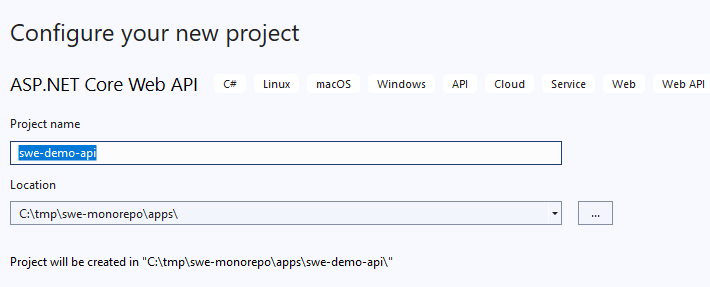
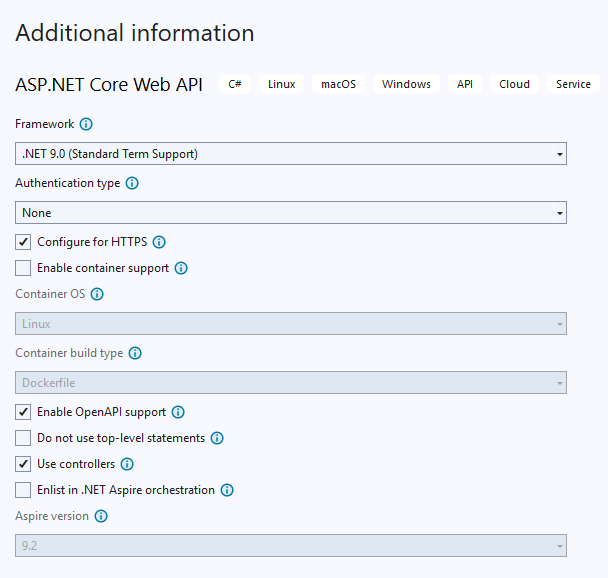
Update our .gitignore
Since we're introducing a .NET 9 API into our monorepo (which previously contained only Angular apps and libraries), we need to update our .gitignore to exclude Visual Studio–specific and .NET build artifacts.
Visual Studio and the .NET SDK generate a variety of local and temporary files, such as user-specific settings, build outputs, caches, and dependency artifacts, that should never be tracked in Git. These files are environment-specific, large, and often regenerated automatically during the build process. Including them in version control would:
- Pollute the repository with unnecessary files (e.g.,
.vs/,bin/,obj/) - Cause merge conflicts between developers using different IDE configurations
- Leak local settings such as breakpoints or user preferences (
*.user,*.suo) - Increase clone and build times unnecessarily
By extending the monorepo's .gitignore with the standard Visual Studio and .NET ignore patterns, we ensure that only source code, configuration, and project files are tracked, keeping the repo clean and consistent across environments.
You can find Visual Studio .gitignores online. Just add the content to the end of .gitignore from our monorepo.
The appsettings.Development.json file contains environment-specific configuration values — such as local database connections, API keys, or debugging settings — that vary from one developer's machine to another.
We exclude it from version control to:
- Prevent accidental exposure of sensitive or local-only data
- Avoid merge conflicts between different developers' local configurations
Each developer can maintain their own local version of this file without affecting others or polluting the shared repository.
Add to .gitignore:
apps/swe-demo-api/appsettings.Development.json
Step 3: Integrate the .NET 9 API as a monorepo app
In this step, we integrate the new .NET 9 API into our existing monorepo structure alongside the existing Angular apps and libraries. Treating the API as a first-class app within the monorepo allows us to manage frontend and backend code in a single repository, simplifying dependency management, CI/CD, and version alignment.
We start the integration by creating a new project.json file for the .NET 9 API. This file defines how the API fits into the monorepo — including its targets, build commands, and project type — allowing Nx to recognize and manage it consistently with the existing Angular apps and libraries.
apps\swe-demo-api\project.json
{
  "name": "swe-demo-api",
  "projectType": "application",
  "sourceRoot": "apps/swe-demo-api",
  "tags": ["scope:backend", "type:api"],
  "targets": {
    "serve": {
      "executor": "nx:run-commands",
      "options": {
        "command": "dotnet run --project apps/swe-demo-api --launch-profile https"
      }
    },
    "build": {
      "executor": "nx:run-commands",
      "options": {
        "command": "dotnet build apps/swe-demo-api"
      }
    }
  }
}
Make sure to check if the api is visible in the Nx Console:
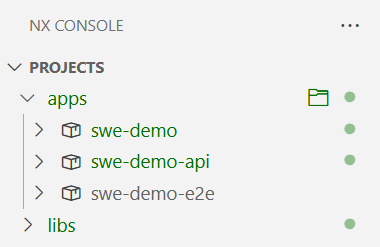
- You can now serve the
apiand check theweatherforecastendpoint, which you can find in the console output.
Swagger
From .NET 9, the default Web API template no longer wires up Swagger/OpenAPI for you. That keeps new APIs minimal, but it also means you must explicitly opt in if you want the interactive docs and OpenAPI spec. You can easily enable it by:
- Adding the nuget package
Swashbuckle.AspNetCore - Adding
builder.Services.AddSwaggerGen();abovevar app = builder.Build();in theProgram.cs - Change the body of the
IsDevelopmentcondition
if (app.Environment.IsDevelopment())
{
    app.UseSwagger();
    app.UseSwaggerUI();
}
- Serve the
apiand append/swagger/index.htmlto the root URL
Step 4: Creating the backend lib structure
In this step we introduce a clean, layered library structure for the backend inside the monorepo. We keep the API (app) slim and push business logic into libraries under libs.
- Create a new folder
swe-demo-backendunderlibs. - Add four
class libraries(following the Clean Architecture style)- SweDemoBackend.Application
- SweDemoBackend.Contracts
- SweDemoBackend.Domain
- SweDemoBackend.Infrastructure
Application
Purpose: Orchestrates behavior. Coordinates domain + infrastructure via interfaces. No EF/HTTP logic here.
Typical contents
- Use cases
- Interfaces for
repositories - Mapping from
DomaintoContracts
public sealed class LegoSetUseCase
{
  private readonly ILegoSetRepository _repo;
  private readonly IMapper _mapper;

  public LegoSetUseCase(IMapper mapper, ILegoSetRepository repo)
  {
    _mapper = mapper;
    _repo = repo;
  }

  public async Task<IEnumerable<LegoSetDto>> GetAllLegoSets(CancellationToken ct = default)
  {
    var entities = await _repo.GetLegoSetsAsync(ct);
    var dtos = _mapper.Map<List<LegoSetDto>>(entities);
    return dtos;
  }
}
Contracts
Purpose: Shape of data at the boundaries (HTTP). Pure, serialization-friendly records.
Typical contents
- Requests/responses
- DTOs
public class LegoSetDto
{
  public Guid Id { get; set; }
  public string Name { get; set; }
  public int NumberOfPieces { get; set; }
}
Domain
Purpose: Core business rules with no infrastructure concerns.
Typical contents
- Entities
 public class LegoSet
 {
   public Guid Id { get; set; } = Guid.NewGuid();
   public string Name { get; set; }
   public int NumberOfPieces { get; set; }
 }
Infrastructure
Purpose: Implements application interfaces using real tech (EF Core, HTTP, etc.). Maps Domain to DB
Typical contents
- DbContext & EntityTypeConfigurations
- Repositories
- Migrations
public class BricksForKidsDbContext : DbContext
{
  public BricksForKidsDbContext(DbContextOptions<BricksForKidsDbContext> options) : base(options) { }

  public DbSet<LegoSet> LegoSets { get; set; }

  protected override void OnModelCreating(ModelBuilder modelBuilder)
  {
    base.OnModelCreating(modelBuilder);
    modelBuilder.ApplyConfigurationsFromAssembly(typeof(BricksForKidsDbContext).Assembly);

    modelBuilder.Entity<LegoSet>().HasData(
              new LegoSet() { Id = Guid.Parse("f3c73d8d-5f8a-4f2a-9c11-2c9a1c2f8d2e"), Name="Harry Potter Zweinstein", NumberOfPieces=1540}
          );
  }
}
 public class LegoSetRepository : ILegoSetRepository
{
  private readonly BricksForKidsDbContext _db;

  public LegoSetRepository(BricksForKidsDbContext db)
  {
    _db = db;
  }

  public async Task<IEnumerable<LegoSet>> GetLegoSetsAsync(CancellationToken ct = default)
  {
    return await _db.LegoSets.ToListAsync();
  }
}
 public class LegoSetConfiguration : IEntityTypeConfiguration<LegoSet>
{
  public void Configure(EntityTypeBuilder<LegoSet> b)
  {
    b.ToTable("LegoSet");
  }
}
Create the four libraries
The easiest way is to open your sln in Visual Studio and add a new .NET 9 class library for each type
SweDemoBackend.Applicationinlibs\swe-demo-backend\applicationSweDemoBackend.Contractsinlibs\swe-demo-backend\contractsSweDemoBackend.Domaininlibs\swe-demo-backend\domainSweDemoBackend.Infrastructureinlibs\swe-demo-backend\infrastructure
Manage the dependencies between the libraries
The following dependencies (project references) must be added:
- Application: reference to Domain and Contracts
- Infrastructure: reference to Application and Domain
- API: reference to Application, Infrastructure and Contracts
Step 5: Setup EF Core
The Infrastructure library is responsible for connecting with our SQL Server database. Therefore it is necessary to install the following nuget packages:
Microsoft.EntityFrameworkCore
Microsoft.EntityFrameworkCore.SqlServer
Microsoft.EntityFrameworkCore.Design
Microsoft.EntityFrameworkCore.Tools
Create a new LegoSet entity in the Entities folder in the Domain library:
namespace SweDemoBackend.Domain.Entities
{
  public class LegoSet
  {
    public Guid Id { get; set; } = Guid.NewGuid();
    public string Name { get; set; }
    public int NumberOfPieces { get; set; }
  }
}
Create a new LegoSetConfiguration class in the Configurations folder in the Infrastructure library. This is extra configuration that we want to use when the database is being created based on our entities:
namespace SweDemoBackend.Infrastructure.Configurations
{
  public class LegoSetConfiguration : IEntityTypeConfiguration<LegoSet>
  {
    public void Configure(EntityTypeBuilder<LegoSet> b)
    {
      b.ToTable("LegoSet");
    }
  }
}
Add the DbContext BricksForKidsDbContext in the Infrastructure library.
  public class BricksForKidsDbContext : DbContext
  {
    public BricksForKidsDbContext(DbContextOptions<BricksForKidsDbContext> options) : base(options) { }

    public DbSet<LegoSet> LegoSets { get; set; }

    protected override void OnModelCreating(ModelBuilder modelBuilder)
    {
      base.OnModelCreating(modelBuilder);
      modelBuilder.ApplyConfigurationsFromAssembly(typeof(BricksForKidsDbContext).Assembly);

      modelBuilder.Entity<LegoSet>().HasData(
                new LegoSet() { Id = Guid.Parse("f3c73d8d-5f8a-4f2a-9c11-2c9a1c2f8d2e"), Name = "Harry Potter Zweinstein", NumberOfPieces = 1540 }
            );
    }
  }
We'll create a DependencyInjection extension class, which allows as to centralize infrastructure-layer registrations (in this case EF Core) behind a single extension method so the API can "plug in" the backend without knowing its internal details.
In the Infrastructure library add the DependencyInjection class:
using Microsoft.EntityFrameworkCore;
using Microsoft.Extensions.Configuration;
using Microsoft.Extensions.DependencyInjection;
using System;
using System.Collections.Generic;
using System.Linq;
using System.Text;
using System.Threading.Tasks;

namespace SweDemoBackend.Infrastructure
{
  public static class DependencyInjection
  {
    public static IServiceCollection AddInfrastructure(this IServiceCollection services, IConfiguration configuration)
    {
      var connectionString = configuration.GetConnectionString("BricksForKidsDBConnectionString");
      if (string.IsNullOrWhiteSpace(connectionString))
      {
        throw new InvalidOperationException("Connection string 'BricksForKidsDBConnectionString' was not found.");
      }


      services.AddDbContext<BricksForKidsDbContext>(options =>
      {
        options.UseSqlServer(connectionString, sql =>
        {
          sql.MigrationsAssembly(typeof(BricksForKidsDbContext).Assembly.FullName);
        });
      });


      return services;
    }
  }
}
We can now call the
builder.Services.AddInfrastructure(builder.Configuration);in theProgram.csin our API. This is essential for- Registering the
EF CoreDbContextusing SQL Server - Keeping the
EF migrationsin theInfrastructureassembly
Why do we structure it this way?
- Clean Architecture boundary: The API (composition root) calls a single
AddInfrastructure(...)and stays ignorant of EF Core, connection strings, or provider specifics. - Testability: The Application layer depends on
interfaces, whileInfrastructureprovides the concrete implementations and DbContext. - Portability: Swapping SQL Server for another provider (or adding caching, SMTP, etc.) is isolated to this method.
- Registering the
Add a LegoSet repository (and interface!).
- Interface is located in the
applicationlibrary - Repository implementation is located in the
infrastructurelibrary - Don't forget to register the
repositoryforDIin theAddInfrastructureextension method
namespace SweDemoBackend.Application.Interfaces.Repositories
{
  public interface ILegoSetRepository
  {
    Task<IEnumerable<LegoSet>> GetLegoSetsAsync(CancellationToken ct = default);
  }
}
namespace SweDemoBackend.Infrastructure.Repositories
{
  public class LegoSetRepository : ILegoSetRepository
  {
    private readonly BricksForKidsDbContext _db;

    public LegoSetRepository(BricksForKidsDbContext db)
    {
      _db = db;
    }

    public async Task<IEnumerable<LegoSet>> GetLegoSetsAsync(CancellationToken ct = default)
    {
      return await _db.LegoSets.ToListAsync();
    }
  }
}
services.AddDbContext<BricksForKidsDbContext>(options =>
{
   options.UseSqlServer(connectionString, sql =>
   {
      sql.EnableRetryOnFailure();
      sql.MigrationsAssembly(typeof(BricksForKidsDbContext).Assembly.FullName);
   });
});

services.AddScoped<ILegoSetRepository, LegoSetRepository>();

return services;
In the application library we now create a UseCase class, which will be used by our API endpoint controllers:
namespace SweDemoBackend.Application.UseCases
{
  public class LegoSetUseCase
  {
    private readonly ILegoSetRepository _repo;

    public LegoSetUseCase(ILegoSetRepository repo)
    {
      _repo = repo;
    }

    public async Task<IEnumerable<LegoSetDto>> GetAllLegoSets(CancellationToken ct = default)
    {
      var entities = await _repo.GetLegoSetsAsync(ct);

      //Mapping
      List<LegoSetDto> dtos = new List<LegoSetDto>();

      entities.ToList().ForEach(e =>
      dtos.Add(new LegoSetDto()
      {
        Id = e.Id,
        Name = e.Name,
        NumberOfPieces = e.NumberOfPieces,
      }));

      return dtos;
    }
  }
}
Our LegoSetDto should be added to the Contracts library
namespace SweDemoBackend.Contracts.Dtos
{
  public class LegoSetDto
  {
    public Guid Id { get; set; }
    public string Name { get; set; }
    public int NumberOfPieces { get; set; }
  }
}
Time to use this UseCase in our API controller. But first register it as a DI service in Program.cs:
// Add services from infrastructure to the container.
builder.Services.AddInfrastructure(builder.Configuration);

// Add use cases
builder.Services.AddScoped<LegoSetUseCase>();
namespace swe_demo_api.Controllers
{
  [Route("api/[controller]")]
  [ApiController]
  public class LegoSetController : ControllerBase
  {
    [HttpGet]
    public async Task<ActionResult<List<LegoSetDto>>> GetAllLegoSets(
        [FromServices] LegoSetUseCase useCase,
        CancellationToken ct)
    {
      var dto = await useCase.GetAllLegoSets(ct);
      return Ok(dto);
    }
  }
}
To get our first LegoSets from our database, we must create an initial migration so the database gets created and our lego set is inserted.
For this, we need to add the Microsoft.EntityFrameworkCore.Design package to the API. After that we can create our initial migration using Add-Migration InitialCreate in the Package Manager Console.
Warning
- In Visual Studio make sure the
swe-demo-apiis set as the Startup project - In the Package Manager Console choose as default project your
infrastructurelibrary
The migration is created in the Migrations folder in the infrastructure library.
Now execute the migration:
Update-Database
There we go, serve the API and check if you get the legoset back as a response from the endpoint:
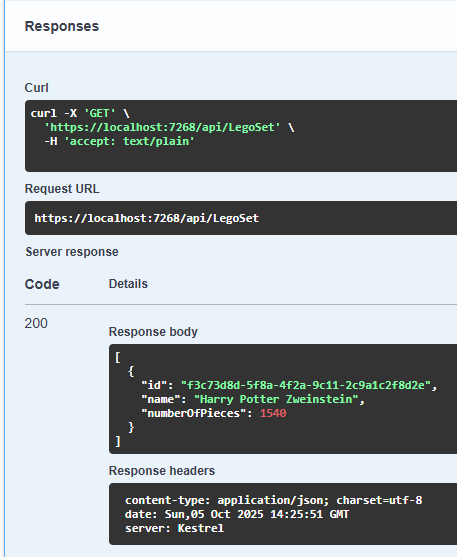
Step 6: Environment variables
The appsettings.Development.json is not a great place to put sensitive data (like a connection string). Luckily with a few easy steps we can also make use of an .env file.
- Install the nuget package
DotNetEnvin theapiproject - Create a
.envfile in the root of theapiproject
CONNECTION_STRING="Data Source=(localdb)\\MSSQLLocalDB;Initial Catalog=BricksForKids;Integrated Security=True;Connect Timeout=30;Encrypt=False;Trust Server Certificate=False;Application Intent=ReadWrite;Multi Subnet Failover=False"
- Add the following code to the
Program.csin theapiproject:
using DotNetEnv;

var builder = WebApplication.CreateBuilder(args);

// Load environment variables from .env file (if it exists)
Env.Load();

builder.Configuration
    .AddJsonFile("appsettings.json", optional: false, reloadOnChange: true)
    .AddJsonFile($"appsettings.{builder.Environment.EnvironmentName}.json", optional: true)
    .AddEnvironmentVariables();
Now we can access the environment variables like:
var connectionString = Environment.GetEnvironmentVariable("CONNECTION_STRING");
//OR
var connectionString = configuration["CONNECTION_STRING"];
Make sure to change this in the DependencyInjection class in the infrastructure library!
Step 7: CORS
When your Angular app (running on http://localhost:4200) calls the API (typically https://localhost:5xxx), the browser enforces Cross-Origin Resource Sharing (CORS). Without a policy, the browser will block requests.
A good idea is to add the allowed origins to the .env file and use them when configuring CORS in your API:
ALLOWED_ORIGINS="http://localhost:4200,http://localhost:4201"
Program.cs
var allowedOriginsEnv = Environment.GetEnvironmentVariable("ALLOWED_ORIGINS") ?? string.Empty;

// Split comma-separated origins, trim spaces, and filter out empties
var allowedOrigins = allowedOriginsEnv
    .Split(',', StringSplitOptions.RemoveEmptyEntries | StringSplitOptions.TrimEntries);

const string FrontendCorsPolicy = "FrontendCorsPolicy";

builder.Services.AddCors(options =>
{
  options.AddPolicy(name: FrontendCorsPolicy, policy =>
  {
    if (allowedOrigins.Length > 0)
    {
      policy
        .WithOrigins(allowedOrigins)
        .AllowAnyHeader()
        .AllowAnyMethod();
    }
  });
});

app.UseCors(FrontendCorsPolicy);